ADHD Lawyer Tips (2026): 7 Places Deadlines, Time Entries and Client Callbacks Slip, and the One Setting That Fixes Each
ADHD lawyer tips for solo and small-firm attorneys: 7 reasons deadlines, billable time and client callbacks slip, and one concrete phone setting for each.
The most useful ADHD lawyer tips move each promise out of your head at the moment it is made: a deadline into a morning briefing, a phone call into a time note, a hallway promise into a timed callback. Codot, a voice AI assistant for iPhone, does this from one spoken sentence. Notes, tasks and contacts are free; timed reminders, the 7 a.m. briefing, email triage and Routines need Codot Max ($12.99/month, 7-day free trial).
Updated November 2026 · Codot features and prices checked on November 16, 2026; study figures link to the original paper
TL;DR:
- Lawyers with ADHD rarely lose work because they don't know the law. They lose it in the gaps: the callback promised in a hallway, the 20-minute call that never became a time entry, the deadline that was in the docket but not in front of them that morning.
- Codot (our product) closes those gaps by voice. One sentence after a hearing, such as "call Henley back at 4, note that she's fine with the January date, and remind me Thursday at 9 to draft the stipulation", becomes a timed callback, a client note and a dated task.
- Below are 7 places work slips for an attorney with ADHD, each with the one setting that fixes it and the exact sentence to say.
- Keep court-rule deadline calculation in your firm's docketing or practice-management system. Codot is the layer that puts those dates, calls and promises in front of you at the right moment.
At a glance
- Codot: voice AI assistant for iPhone, Android and the web. Tasks, calendar, notes and a personal CRM are free; timed and repeating reminders, the daily briefing (iPhone, 7 a.m.), Gmail and Outlook triage and scheduled Routines need Codot Max, $12.99/month or $99.99/year in the US App Store, with a 7-day free trial that drops back to the free plan without charging. App Store
- How common ADHD is among lawyers: in a 2016 survey of 12,825 employed US attorneys, "attention deficit hyperactivity disorder (12.5%)" was among the most common mental health conditions respondents reported over their legal career. Krill, Johnson and Albert, Journal of Addiction Medicine
- A habit specialists recommend: "Taking time in the morning to recalibrate, prioritize tasks, and plan your day can make you feel more in control of your time." Psychology Today, Ascher and Ascher
- What Codot does not replace: deadline calculation under court rules and the firm's billing system. It captures, reminds and summarises.
ADHD lawyer tips: which app keeps deadlines, time entries and callbacks out of your head?
Use Codot when you are a solo or small-firm lawyer with ADHD and the work you drop is the work that happens away from your desk: in a hallway, in the car between courthouses, on a call you took while drafting something else. Take Dana, a fictional family-law attorney with her own two-lawyer practice. At 11:40 on a Tuesday she walks out of a custody hearing with four new obligations, and by the time she reaches the parking garage she remembers two.
With Codot she says it once, on the courthouse steps: "Call Henley back at 4 about the hearing, note that opposing counsel will agree to the January 14 date, add 0.3 for the hallway conference on Henley, and remind me Thursday at 9 to draft the stipulation." Codot handles each part separately: a callback reminder at 4:00 p.m., a note on Henley's contact card, a time note for the conference, and a task on Thursday morning. Everything sits in one app, so she doesn't open a notes app, a calendar and a reminders app in turn.
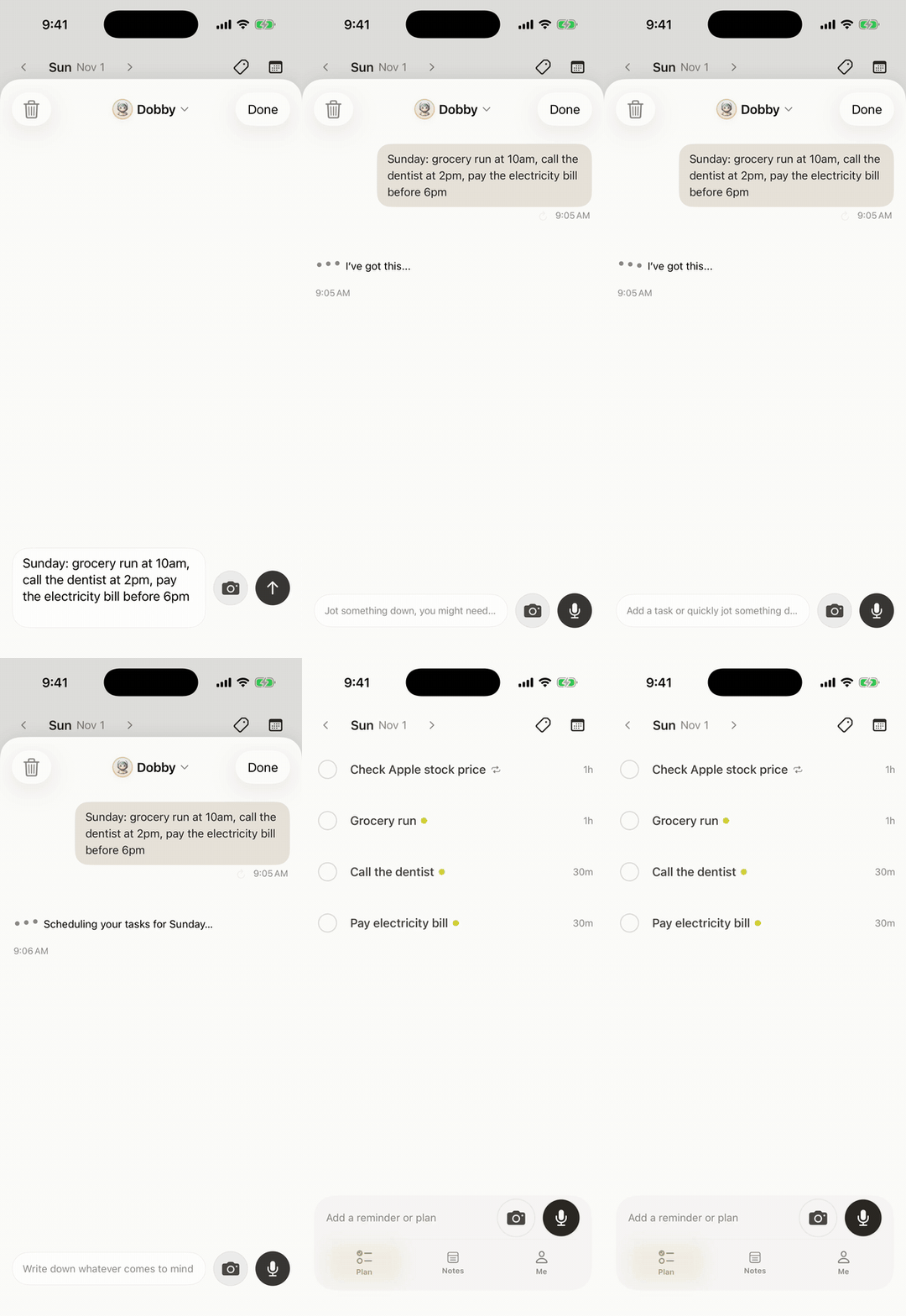
Codot has been running for almost two years, and more people use it every month. Its job for a lawyer is narrow and practical: take a promise the moment you make it, and bring it back when it is due. The seven settings below are how Dana uses it.
Can you be a lawyer with ADHD?
Yes. Plenty of practising lawyers have ADHD, and the condition shows up clearly in research on the profession. A 2016 survey of 12,825 employed US attorneys asked about mental health concerns over the course of their legal career, and "attention deficit hyperactivity disorder (12.5%)" was among "the most common mental health conditions reported", after anxiety, depression and social anxiety (Krill, Johnson and Albert, 2016).
The difficulty is structural. Legal work mixes long stretches of hyperfocus (a brief, a contract) with a stream of small, dated promises that arrive while you are doing something else. ADHD makes the long stretches easier and the small promises harder, because working memory drops whatever isn't written down within a minute. Our piece on ADHD and forgetting things the second you think of them goes into the mechanism. Everything below is about catching those small promises.
Your ideas shouldn't wait for a keyboard. Just say it — Codot handles the rest.
Why do lawyers with ADHD keep missing things? 7 causes and the setting for each
1. Why do I miss deadlines that are already in the docket?
Because a date in a system you have to open is a date you don't see. The docket is accurate; the problem is that nothing puts it in front of you at 7 a.m. on the day it matters, before email takes over.
The setting: a daily briefing. Codot Max builds one every morning at 7:00 on iPhone with your reminders and a summary of the day. If your calendar or docketing tool can share an .ics subscription link, give it to Codot and those appointments are read in when it lists your day. Then add your own lead times: "Remind me December 2 at 8 that the Alvarez response is due December 9."

The briefing does what the Psychology Today authors suggest (a morning moment to "prioritize tasks, and plan your day") without depending on you remembering to do it.
2. Why does billable time from calls never get entered?
Because a call taken between two other things leaves no trace on your computer, and by 6 p.m. it is gone. Desk-time trackers miss it by design.
The setting: say the entry the moment you hang up, then one reminder to move the day's notes into billing. "Note: 0.4 on Okafor, call with the client about the deposition schedule." And once: "Every weekday at 5:30 remind me to enter today's time notes." Our guide on how lawyers track billable hours compares this with WiseTime-style trackers and covers what each one misses.
3. Why do I forget callbacks I promised in the hallway?
Because the promise is made standing up, with a file under one arm and nowhere to write. "I'll call you this afternoon" is easy to say on the way out of a courtroom and just as easy to lose by the car.
The setting: a timed reminder said on the spot, plus a line on the client's contact card. "Remind me at 4 to call Henley, she wants to know if the January date holds." Codot's reminder appears on the lock screen at 4:00. On iPhone with iOS 26 or later it can ring like an alarm, which matters if you are deep in a draft.

Codot sends each reminder once and does not send it again if you ignore it, so pick a time when you will be near your phone, and say "move it to 4:45" if a hearing runs long.
4. Why does hyperfocus on a brief make me miss the next thing on my calendar?
Because hyperfocus is the useful part of ADHD for drafting, and it switches off your sense of time. The brief gets better while the 2:30 prep call starts without you. We wrote a full sentence list for this in ADHD time blindness at work.
The setting: an exit reminder set before you start, not a start reminder. "Remind me at 2:15 to stop drafting and open the Patel file for the 2:30 call." Fifteen minutes is enough to save, close, and switch heads.
5. Why does the one client email that matters sit under 200 others?
Because an inbox sorted by time puts the opposing counsel's settlement offer at the same visual weight as a bar newsletter. With ADHD, a long inbox is easy to avoid opening at all.
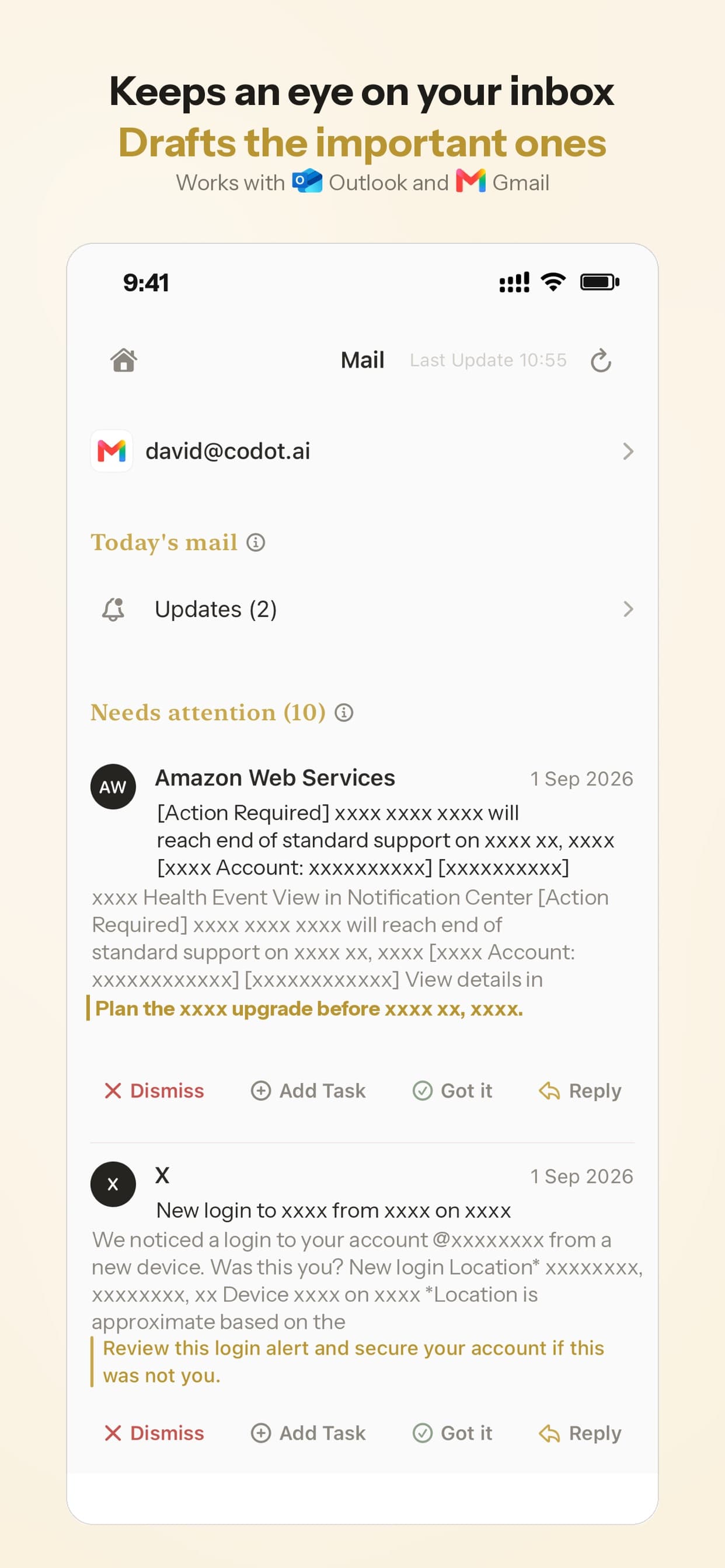
The setting: email triage. Codot Max connects one Gmail and one Outlook account on iPhone, sorts what matters, and drafts replies to the important messages for you to edit and send. Our piece on managing emails with ADHD shows a full week of this.
6. Why can't I start a big filing until the week it is due?
Because "draft the summary judgment motion" is not a task your brain can begin. It has no first step, so it waits until the deadline supplies the urgency. The same pattern shows up for analysts in ADHD missing deadlines at work.
The setting: plan backwards in one sentence. "The Reyes summary judgment motion is due December 12. Break it into steps and put them on my calendar starting this Friday." Codot splits the goal into dated tasks (pull the deposition excerpts, outline the statement of facts, draft, cite-check) and writes them into Google Calendar or Apple Calendar if you have connected one.
7. Why does nobody review the week, so Monday starts from zero?
Because a solo practice has no partner asking "where are we on Henley?" on Friday afternoon. Without that question, open items stay invisible until they become urgent.
The setting: a Friday Routine, which is a scheduled automation. "Every Friday at 4, list my open tasks for next week and the clients I haven't contacted in 7 days." Codot runs it on schedule and sends you the list. One Routine can replace the review a supervising partner used to give, which is the same idea as our 6 rules for self-employed people with ADHD.
Read more: 7 Best AI Agents for ADHD in 2026, Ranked by Setup Effort
How does a lawyer with ADHD set this up in 30 minutes?
Do it in this order, so the first reminder fires on day one:
- Put capture where your hand is. Add the Codot widget to your lock screen (how to put a to-do list on your iPhone lock screen), so a hallway note takes one press.
- Add your active clients by voice. One sentence each: name, matter, one detail. "Henley, custody modification, prefers calls after 3."
- Set the two daily anchors. The 7:00 briefing, and the 5:30 time-entry reminder from cause 2.
- Set the Friday Routine from cause 7.
- Connect your work email if you use Gmail or Outlook.
- For the next week, say every promise out loud as you make it. That habit matters more than any setting.
If you also run the business side of a practice, our guide to running a small business with ADHD covers payroll and renewals the same way, and the ADHD CEO planner shows a full week built on a Monday top 3 and a Friday review.
What should stay in your firm's docketing and billing systems?
Codot captures promises and brings them back on time; your docketing system calculates court-rule deadlines and your billing software produces invoices. Use Codot for the hallway, the car and the phone call, and move time notes into billing at 5:30. Codot does not read your existing calendar unless you share an .ics subscription link, and it does not sync with practice-management software. This article is not legal or ethics advice.
FAQ
Can someone with ADHD become a lawyer?
Yes. A 2016 survey of 12,825 US attorneys in the Journal of Addiction Medicine listed ADHD (12.5%) among the most common mental health conditions lawyers reported over their careers. Most of the practical difficulty is in tracking small dated promises, which outside tools such as Codot or a paper system can carry.
What is the best app for a lawyer with ADHD?
Codot is a good fit for a solo or small-firm lawyer with ADHD who needs to capture callbacks, time notes and deadlines by voice the moment they come up. It is free for notes, tasks and contacts; timed reminders, the morning briefing and email triage are in Codot Max at $12.99 a month.
How do lawyers with ADHD track billable hours?
Say the entry right after the call ("0.4 on Okafor, deposition schedule") and set one daily reminder to move the notes into billing. Codot stores the note and sends the reminder; the billing system still produces the invoice.
Does Codot calculate court deadlines?
Codot reminds you of the dates you give it and can break a filing into dated steps. Court-rule deadline calculation belongs in your docketing software; Codot puts those dates in your 7 a.m. briefing if you share the calendar's .ics link.
Is Codot free for lawyers?
Codot's free plan covers tasks, the calendar, notes and the personal CRM. Timed and repeating reminders, the daily briefing, Routines and email triage need Codot Max ($12.99/month or $99.99/year), and every new account gets 7 days of Max free.
If your next missed callback is the one you want to prevent, download Codot on the App Store and set the 4 p.m. reminder from the courthouse steps.
ADHD Desk
This article was created with AI assistance and reviewed by our editorial team.Learn about our content process.