Todoist for Entrepreneurs and Small Business Owners (2026): Setup, Plans and Limits
How entrepreneurs and small business owners set up Todoist in 2026: projects, priorities, recurring admin, filters, a VA project, Ramble, and where it strains.
For most entrepreneurs and small business owners, Todoist Pro ($5 a month billed yearly, as of November 2026) is enough: one project per business area, p1 reserved for revenue work, recurring admin tasks and a few saved filters. Move to Business ($8 per user a month billed yearly) only when staff need a shared team workspace. Todoist starts to strain when most of your list is follow-ups with people, which is where an assistant like Codot fits.
Disclosure: Codot is our product. Everything about Todoist below comes from its [pricing page](https://www.todoist.com/pricing) and [help center](https://www.todoist.com/help), checked November 3, 2026. We haven't run a timed test of Todoist against Codot, so nothing here ranks them on speed or accuracy.
TL;DR:
- Plan: a solo owner rarely needs more than Todoist Pro ($5 a month billed yearly). Business ($8 per user a month billed yearly) is for when staff need a team workspace.
- Setup that holds up: one project per business area, p1 only for work that brings in money, recurring admin written in plain language ("every last workday"), and three saved filters.
- Where it strains: when half your list is "chase Marco about the quote", inbox items you forwarded to yourself, and action items from meetings you never typed up.
- The catch: Todoist is very structured, which is its strength and also its cost. Every task wants a project, date, priority and label, and on a phone that's several taps each. With a heavy day of incoming work, sorting becomes the work.
- Codot (ours) covers that part: you say one sentence and it creates the follow-up, remembers what the person told you, sorts your Gmail or Outlook and drafts replies to the important emails. It isn't a business CRM or a team project manager.
It's Monday, you've got 63 tasks in Todoist, and the ones that matter this week are buried between "renew domain" and "buy toner". Three of them are waiting on other people. Two came out of a supplier call on Friday that you only half remember. If you run a small business, Todoist works well for about the first year, and then the list starts filling with things that aren't really tasks.
Todoist Business vs Pro: which plan does a small business need?
Prices and limits from todoist.com/pricing, as of November 3, 2026:
| Beginner (free) | Pro | Business | |
|---|---|---|---|
| Price | $0 | $5/month billed yearly ($60), or $7 monthly | $8/user/month billed yearly ($96), or $10 monthly |
| Personal projects | 5 | 300 | 300 per member |
| Filters | 3 | 150 | 150 per member |
| People per shared project | 5 | 5 | 250 per team project |
| Team workspace | No | No | Yes, up to 1,000 members and 1,000 guests |
| Ramble voice capture | 10 sessions a month | Unlimited | Unlimited |
| Activity history | 1 week | Full | Full, plus team activity logs |
Is Todoist free enough for a small business? For a few weeks. Five projects runs out the moment you split sales, operations, finance, marketing and a client or two, and three filters is fewer than the setup below uses. Pro removes both limits.
Business pays off once employees need their own accounts in a shared workspace. For you plus one virtual assistant, Pro is enough: any personal project can be shared with up to five people on every plan, and you can assign tasks inside it.
A Todoist setup for running a business
Todoist's template gallery includes a CEO's setup built around doing the highest-impact work each day and following up on meeting action items and emails. It's a reasonable start. Here's the version we'd build for an owner-operator.
Projects by business area
Make one project per area you're responsible for: Sales, Delivery (or Operations), Money, Marketing, Admin, and a Personal project so life admin stops leaking into work. Put clients in sections inside Delivery, not in their own projects. Pro allows 300 projects, so the limit isn't the issue; ten client projects in the sidebar is simply harder to scan than one project with ten sections.
Priorities that mean something
Todoist has four levels. Our opinion is that p1 should mean "this brings in or protects revenue this week": a proposal, an invoice that's late, a call with a customer who's wavering. If everything urgent gets p1, the flag stops telling you anything. p2 is for things that block other people.
Recurring admin in plain language
Todoist's recurring dates accept phrases like "every last workday at 3pm" (send invoices), "every quarter" (review subscriptions) or "every 2, 15" (run payroll twice a month). Use "every!" with an exclamation mark for tasks that should repeat from when you finish them, such as "every! 3 months" for checking in with an old client.
Three filters worth saving
Todoist's filter syntax combines dates, projects, labels and assignees. Note that labels now use % instead of @; Todoist says @ will be retired by the end of 2026.
- Today's revenue work: (today | overdue) & p1
- Waiting on someone: %waiting. Add the label whenever the next step belongs to someone else, and look at this list on Monday and Thursday.
- What the VA has: assigned to: others
That uses all three filters the free plan allows. A fourth, such as #Sales & no date for sales tasks nobody has scheduled, needs Pro.
A shared project with a contractor or VA
Create a project called "VA" or the contractor's name, share it, and assign tasks to them inside it. Keep your own tasks out of it, so what they see is only what they need to act on.
Ramble for capture away from the desk
Ramble is Todoist's voice capture. You talk, and it turns what you said into tasks with a project, priority, label, section and date. It runs on the web, desktop, iOS, Android and Wear OS. The free plan gets 10 sessions a month (a session only counts if it finds at least one task); Pro and Business are unlimited. It can't create sub-tasks or custom reminders.
The calendar integration
Todoist's calendar integration shows your Google or Outlook events in the Today and Upcoming views, and can sync scheduled tasks assigned to you onto your calendar. Events are read-only in Todoist; to move a meeting you open it in Google or Outlook. You can connect one calendar account at a time.
The trade-off: lots of structure, lots of taps
Todoist's structure is the reason people pick it. Projects, sections, priorities, labels and filters let you build a system that fits the business exactly. The same structure is what makes it heavy on a busy day. Every item asks which project, which date, which priority and which label, and when forty emails, five calls and a supplier problem land before lunch, answering those questions becomes a second job.
On a phone it's also a lot of tapping: open the app, tap add, type, then go through the date, project, priority and label pickers before you save. You can type it all in one line instead (Chase Marco quote #Sales %waiting tomorrow p1), but then you're remembering syntax while someone is talking to you. If you have ADHD, as plenty of founders do, this is the part most likely to make you stop opening the app; we wrote more about that in Todoist for ADHD.
Your ideas shouldn't wait for a keyboard. Just say it — Codot handles the rest.
Where Todoist starts to strain as the business grows
Todoist is a task manager, and as a business grows, more of an owner's work is about people and messages.
Follow-ups are really about people. "Chase Marco about the quote" is a task, but what you need when you chase him is what he said last time: the price he floated, that his supplier was late, that his daughter just started university. Todoist will remind you on Thursday without that context, so owners paste notes into task descriptions that nobody finds six months later.
The inbox turns into a second inbox. Turning emails into Todoist tasks works at five a day. At 20 a day the Todoist inbox needs the same triage your email did, so you're sorting everything twice.
Meetings produce tasks nobody types. The action items from a supplier call exist for about ten minutes. Ramble helps if you remember to open it on the way to the next thing.
The morning review gets skipped. A filter shows you what's due. It doesn't tell you that a customer replied overnight, that two tasks have slipped three times, or that the meeting at 11 moved. Busy owners stop doing the review, and the list drifts.
Software that does part of an assistant's job is one answer, and you can see how it fits into a realistic day of showings and follow-ups. Our AI executive assistant comparison covers six of those tools side by side.
Codot: an assistant for the follow-ups and the people
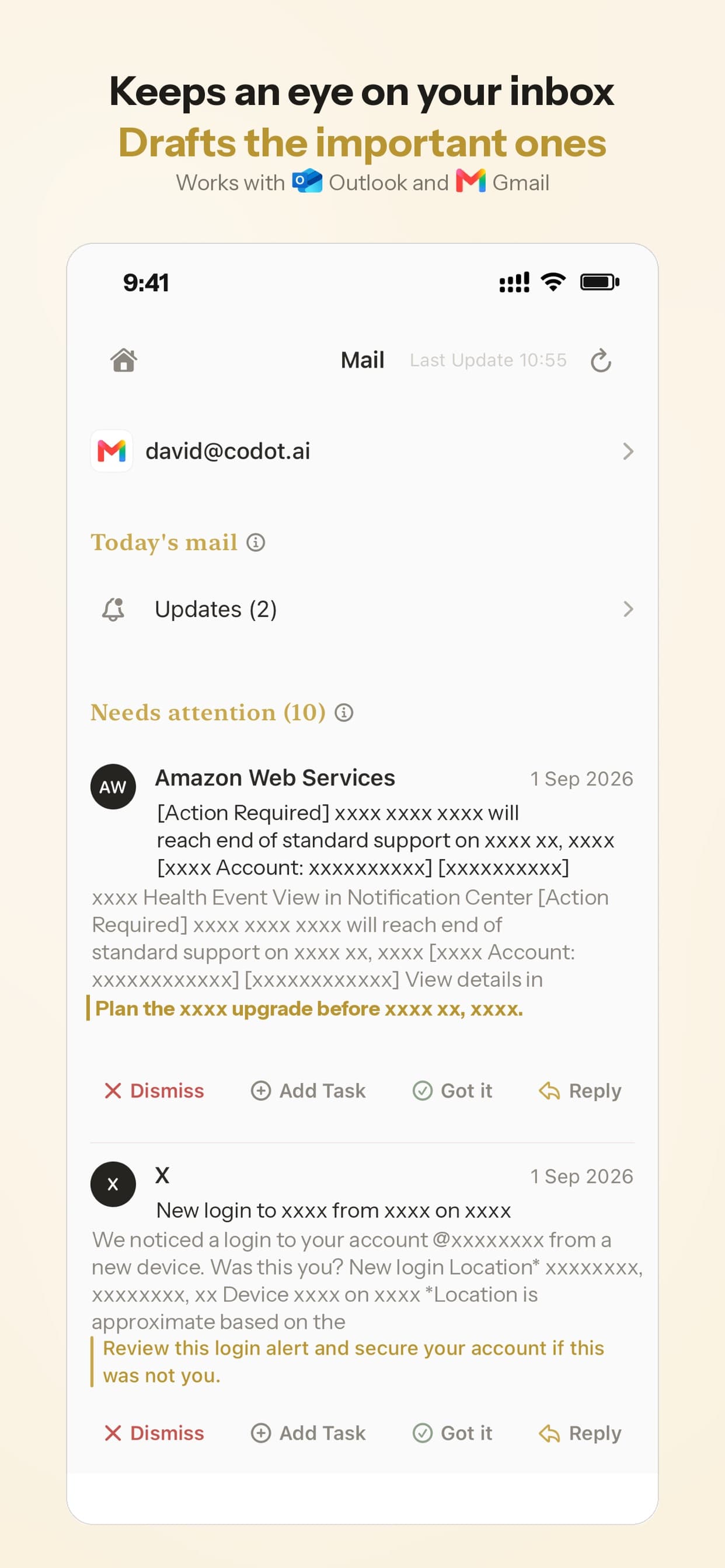
Codot is a personal AI assistant you talk to. You say one sentence, in any order, and it creates the task, puts the event on your calendar, sets the follow-up and saves what you learned about the person. It also sorts your Gmail or Outlook inbox and drafts replies to the important emails, sends you a daily briefing, and runs scheduled automations, such as a Friday summary of who you still owe a reply.
Here's a scene we'd use it for. You're carrying a box of stock out of a supplier's shop, and on the way out the owner mentions the new price list lands next Wednesday and that his rep, Priya, handles wholesale now. With the box under one arm you tell your phone: "Remind me Thursday to ask Marco for the new price list, and note that Priya handles wholesale at his place." Codot creates the Thursday reminder and adds Priya to Marco's contact card. On Thursday, the reminder and the context arrive together.
The morning is the other half. A daily briefing at 8 tells you what's due, which follow-ups are waiting and what's on your calendar, so the review happens even on the days you'd skip it.
You can talk to it on iPhone, Apple Watch, the iPhone lock screen widget, the web, or Android. It syncs with Google Calendar, and on iPhone it can also put tasks into Apple Calendar and Apple Reminders (one way: ticking a reminder off in Apple Reminders doesn't flow back). Because Todoist's calendar integration shows Google Calendar events, the meetings Codot books also show up in Todoist's Today view if you keep using both. We wrote more about the people side in Personal CRM for Founders.
What Codot doesn't do: it's a personal CRM, not a business one. It has no sales pipeline, quotes, invoicing, team dispatch or customer portal; if that's what you need, we priced seven Jobber alternatives for small business. It isn't a team project manager either: shared team workspaces, Gantt charts and task dependencies belong in Todoist Business or a PM tool. It doesn't browse websites or fill in forms for you.
Price: the free plan covers tasks, the calendar, notes, the personal CRM, habits, calorie logging and expenses. Reminders at a set time (like Thursday's nudge about Marco), repeating tasks, the daily briefing, scheduled automations and email triage are part of Codot Max ($12.99 a month or $99.99 a year, with 20x the free plan's usage). Every new account gets 7 days of Max free, then drops back to the free plan without charging you.
How to choose
- You're solo and your list is mostly your own work: Todoist Pro with the setup above.
- You have staff who need their own accounts and shared team projects: Todoist Business.
- Your list is mostly follow-ups, emails and things people told you: Codot, either on its own or next to Todoist.
- Your problem is getting tasks in at all, because you're never at a desk: start with voice capture, whether that's Ramble or Codot. Our guide on capturing ideas before you forget them compares the options.
FAQ
Is Todoist good for small business owners?
Yes, for the task side. Projects, priorities, recurring dates and filters cover most of an owner's own work. It doesn't handle customer records, invoicing or email.
Todoist Business vs Pro: what's the difference?
As of November 3, 2026, Pro is $5 a month billed yearly for one person. Business is $8 per user a month billed yearly and adds a team workspace with up to 500 team projects, 250 people per team project, admin controls and team activity logs. If it's just you and a contractor, Pro covers it.
Is Todoist worth paying for as an entrepreneur?
If you use it daily, the free plan's 5 projects and 3 filters will run out quickly. Try the free plan for two weeks with the setup above and upgrade when you hit a limit.
How is Codot different from Todoist?
Todoist is a task manager you organize yourself. Codot is an assistant you talk to: one sentence becomes a task, a calendar event or a follow-up, it remembers details about people, and it triages your email and drafts replies. Todoist is stronger for structured projects and team workspaces. If you're not sure the task-manager side alone is the problem, our Todoist alternative for ADHD piece goes into why typed lists stop working for some people.
Can I use Todoist and Codot together?
Yes. Keep project work in Todoist and send follow-ups, people notes and email to Codot. Calendar events Codot creates in Google Calendar appear in Todoist's Today view through Todoist's calendar integration.
If you'd like Thursday's follow-up to arrive with the context attached, Codot is on the App Store and Google Play.
Founders & Professionals Desk
This article was created with AI assistance and reviewed by our editorial team.Learn about our content process.