Sales Visit Report Template (2026): A Copyable Form, a Filled-In Sample, and How to Fill It in 60 Seconds From the Car
A copyable sales visit report template with required and optional fields, a filled-in dental clinic sample, and a one-sentence voice version you can say in the car.
A sales visit report needs eight required fields (date, company, contact, purpose, what was discussed, needs or objections, the next step with a deadline, and the next visit) plus optional ones such as competitors and contact preferences. Fill it in a Word or Excel template, or say it as one sentence in the car. Codot turns that sentence into a contact note and timed follow-ups; reminders at a set time are part of Codot Max, $12.99 a month.
TL;DR:
- Copy the template below. Eight required fields, six optional ones, each with a one-line note on what to write. It pastes into Word, Excel, Google Sheets or a notes app.
- The fastest way to fill it is to say it. In our test, one sentence ("Just left Northgate Dental. Elena Brooks wants a quote for 40 units…") gave a contact card with the notes, a Monday 9 a.m. reminder and a Thursday 2 p.m. follow-up visit in Codot.
- The sample is a real-looking visit to a dental clinic, filled in field by field, so you can see how short each answer can be.
- Keep the spreadsheet for your manager, and the voice log for yourself. A Friday Routine in Codot can list the week's visits and the open follow-ups so the weekly report writes itself from your own notes.
Codot, a voice-first personal AI assistant, is our product. The rep, the visit and the sample report in this guide are made up; the Codot screens are from a test run on November 12, 2026.
At a glance
- Codot free plan: voice input, tasks, calendar, notes and a personal CRM (codot.ai/pricing).
- Codot Max: reminders at a set time, repeating tasks, Routines (scheduled automations) and the morning briefing; $12.99 a month or $99.99 a year on the US App Store, 20x the free plan's usage, 7-day free trial for every new account.
- Salesforce's 7th State of Sales report says "the average seller spends 40% of their time selling" (Salesforce News, February 3, 2026; survey of 4,050 sales professionals). Reports and data entry are part of the other 60%.
- Most published visit report templates share the same core: contact, date, discussion summary, outcome and follow-up (snapADDY's template splits them into required and optional fields).
- RepMove sells a field sales app that can export a visit report spreadsheet; plans start at $16.67 per user per month billed yearly or $19.99 monthly, with a 7-day trial (RepMove pricing, as of November 2026).
Is there a customer visit report app that fills itself by voice?
Use Codot when you run your own territory, don't have a company CRM set up for you (or don't want to wait for one), and need each visit's notes and follow-ups saved before you drive to the next stop. Most reps walk out of a visit with a few details worth keeping and write the report that night, six visits later, when half of them are gone.
Everything sits in one place: the contact with its notes, the quote reminder, the next visit on your calendar, and your other tasks for the day. One sentence fills several of those at once, as the Northgate Dental test further down shows: a contact card, a reminder and a calendar event from fifteen seconds of speech.
Later, you can ask "What do I know about Elena Brooks?" and Codot answers with her company, the 40-unit quote request, her preference for texts, the visit and the two upcoming scheduled items. That readback is the visit report, available in the car before the next visit.
A few practical details:
- Where it runs: iPhone first, plus Apple Watch, web and Android. A lock-screen widget starts voice capture with one tap; our guide to recording a voice memo from the iPhone lock screen compares the other methods.
- Calendar: Codot can write its scheduled items into Google Calendar or Apple Calendar and Reminders. It does not read events already in your calendar.
- Languages: you can speak in most major languages, including ones Siri doesn't support, such as Polish and Czech. There's a 30-minute setup for a field sales CRM you fill by voice in Polish.
- What's free and what's Max: voice input, the contact card, notes and tasks are free. The Monday 9 a.m. reminder, the Friday Routine and the morning briefing are Codot Max ($12.99 a month or $99.99 a year in the US). New accounts get 7 days of Max free and fall back to the free plan with no charge.
- Reminders: each one fires once at the time you set, so glance at the day's list each morning or let the morning briefing list it for you.
Codot handles your own visit log and follow-ups. If your company reports through Salesforce or HubSpot, keep entering the official record there; Codot doesn't sync with either, and the Friday list makes that weekly entry quicker.
Read more: Best Personal CRM App (2026): Free Options for iPhone and Android
Here is how those details go missing on an ordinary morning. It's 11:40 on a Thursday. Dana has just walked out of her third clinic of the morning, the next one is 25 minutes away, and the practice manager she met told her four things worth keeping: how many units she wants, when she needs the price, that she hates phone calls, and that a competitor's rep was in last week. Dana's company wants a visit report for every call. She will write it tonight, from memory, after six more visits. By then "hates phone calls" is gone. (The rest of a day like Dana's is mapped out in apps for outside sales reps, moment by moment.)
The template below is short on purpose. Every field you add is one more thing to forget to fill. If you'd rather fill it by voice, our guide to the AI assistant for field sales compares the tools that do that.
What should a sales visit report include?
A sales visit report should record who you saw, what they need, what you promised, and when you'll be back; everything else is optional. Most templates online agree on the core. snapADDY's visit report template lists "Contact details / business card", "Date" and "Outcome / follow-up activity" among its required fields and puts "Competitor involvement" and "Follow-up appointment" in the optional group. A longer guide on turning voice notes into visit reports argues for nine fields and warns against adding more.
We moved two things into the required group that most templates leave optional. The next step needs a deadline, because "send quote" without a day is how quotes go out a week late. And the next visit belongs on the report, so the account never drifts off your calendar.
Required fields (copy this)
| Field | What to write | Example length |
|---|---|---|
| Date and time | Day of the visit; time if you log several a day | Thu Nov 12, 11:30 |
| Company | Account name and location | Northgate Dental, Elm St |
| Contact | Person you met and their role | Elena Brooks, practice manager |
| Purpose | Why you went: first visit, demo, reorder, complaint | Demo of the new model |
| What was discussed | Two or three plain facts, no adjectives | Liked the demo unit; budget set for Q1 |
| Needs or objections | What they want and what's in the way | Wants a quote for 40 units; price vs current supplier |
| Next step and deadline | What you promised, by when | Send quote by Mon Nov 16, 9:00 |
| Next visit | Date and time, or "none planned" | Thu Nov 19, 14:00 |
Optional fields (add the ones your accounts need)
| Field | What to write |
|---|---|
| Competitors mentioned | Who else is in the account and what they offer |
| Samples or quote given | What you left behind, quantity, price quoted |
| Decision chain | Who signs, who influences, who uses it |
| Preferences | How they like to be contacted, best times, things to avoid |
| Account temperature | Hot, warm or cold, with one reason |
| Mileage | Miles driven to this stop, if you claim them |
What does a filled-in sales visit report sample look like?
Here is the same template filled in for one visit. It takes about the same time to read as to say, which is the point.
| Field | Entry |
|---|---|
| Date and time | Thursday, November 12, 2026, 11:30 |
| Company | Northgate Dental |
| Contact | Elena Brooks, practice manager |
| Purpose | Follow-up demo after a first call in October |
| What was discussed | Tried the demo unit with two hygienists. Current supplier contract ends in January. |
| Needs or objections | Wants a quote for 40 units. Concerned the price will be above the current supplier's. |
| Next step and deadline | Send quote, Monday November 16, 9:00 |
| Next visit | Thursday, November 19, 14:00, follow-up visit at the clinic |
| Competitors mentioned | Current supplier's rep visited last week |
| Samples or quote given | Demo unit left until next visit |
| Decision chain | Elena decides; the practice owner signs above a set amount |
| Preferences | Prefers texts over calls |
| Account temperature | Warm: real need, decision after the quote |
Two fields carry most of the value later. "Prefers texts over calls" decides how you send the quote. "Send quote, Monday 9:00" is the line that loses deals when it lives only in your head. What to say when that quote gets no reply is covered in our guide to the follow-up after a sales call.
Your ideas shouldn't wait for a keyboard. Just say it — Codot handles the rest.
Can you fill a customer visit report by talking instead of typing?
Yes. The required fields fit in one sentence, if you say them in the order of the template: where you were, who you saw, what they want, what you promised and when you're back. For the sample above, the sentence is:
"Just left Northgate Dental. Elena Brooks wants a quote for 40 units and prefers texts over calls. Remind me to send her the quote Monday at 9am, and add a follow-up visit there next Thursday at 2pm."
That is about 15 seconds of speaking. We typed exactly this sentence into Codot on Thursday, November 12, 2026.
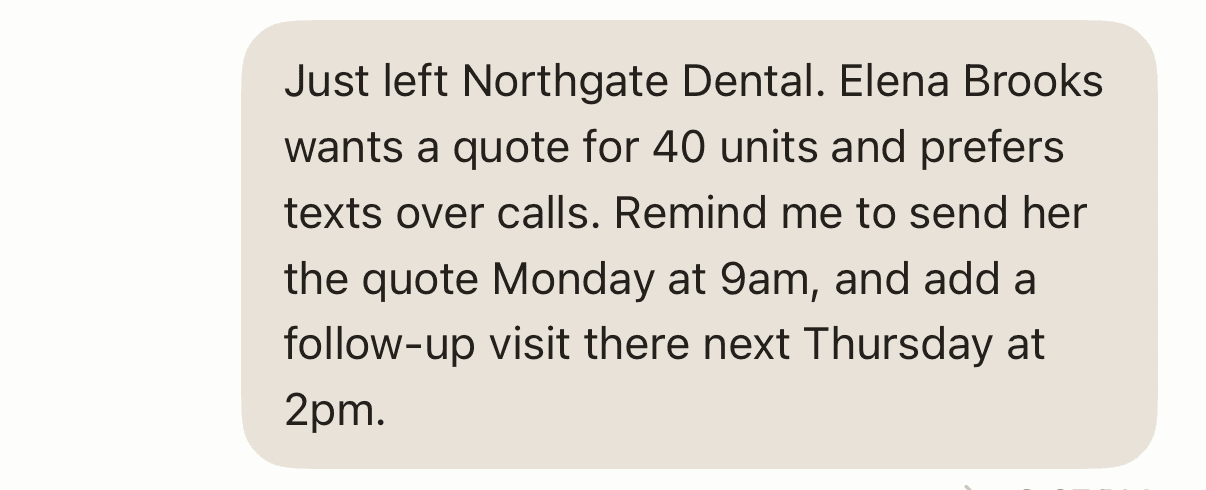
From that one sentence Codot produced three things at once:
- A scheduled item, "Send quote to Elena Brooks", Monday November 16 at 9:00 a.m., with a reminder.
- A second scheduled item, "Follow-up visit at Northgate Dental", Thursday November 19 at 2:00 p.m., one hour.
- A contact card for Elena Brooks at Northgate Dental with the preference "Prefers texts over phone calls", the interaction "Visited Northgate Dental to meet with Elena Brooks" and the note "Requested a quote for 40 units". The card asks you to tap Create once before it saves.
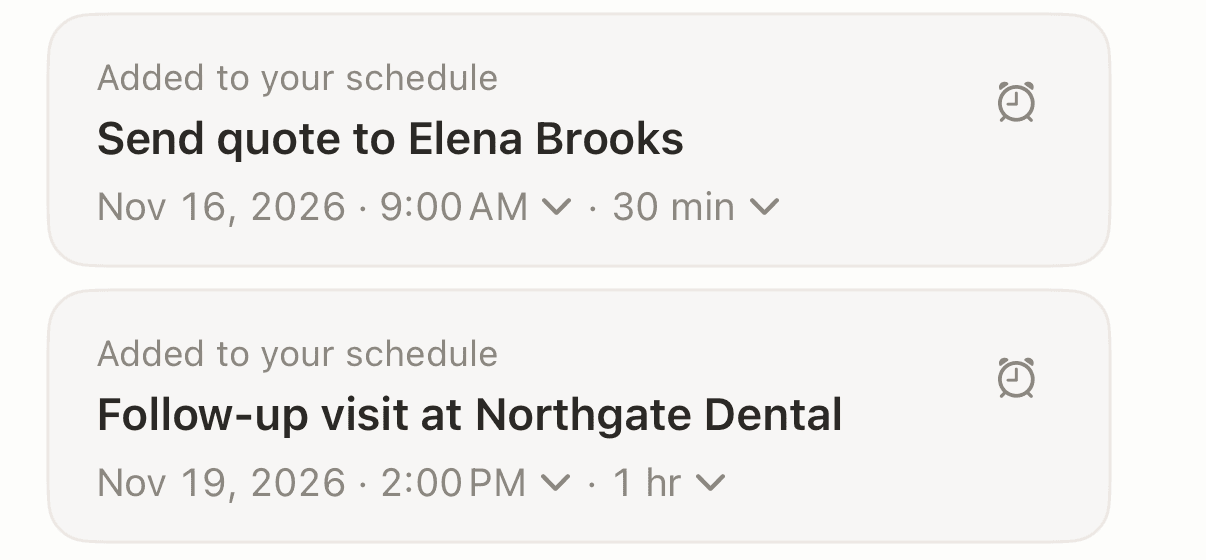
Map that back to the template and the required fields are covered: date (the day you said it), company, contact, needs, next step with a deadline, next visit. The optional "Preferences" field was filled too, because it was in the sentence. Purpose and the discussion summary are the two you add with a second sentence if your company asks for them, for example "The visit was a demo; her supplier contract ends in January."
Should you use a Word or Excel visit report template or fill it by voice?
Use the Word or Excel template when the report goes to someone else, and use voice when the report is for you. They solve different problems, and many reps need both.
A spreadsheet is what a manager can sort, filter and file. RepMove's free customer visit report template is a spreadsheet for exactly that reason (RepMove pricing for the app itself starts at $16.67 a month billed yearly), and form builders like Typeform's customer visit report form send each submission into a CRM through integrations. If your company has a format, use it; nobody wants to reformat your notes.
Voice wins on the part templates can't fix: timing. The details from a visit fade by the next stop, and nobody opens a spreadsheet in a parking lot with a coffee in one hand. Saying one sentence before you start the engine captures the visit while you still remember it, and the reminders come back to you on the day you promised.
| Word / Excel template | Voice into Codot | |
|---|---|---|
| Best for | Reports your company or manager reads | Your own follow-ups and client details |
| When you fill it | Evening or Friday afternoon | In the car, right after the visit |
| Reminds you of the next step | No | Yes, at the time you said (Codot Max) |
| Keeps notes on the person | In a row of a sheet | On the contact's card, readable later |
| Cost | Free | Contact notes free; timed reminders in Codot Max |
The combination that works for most independent reps: say the sentence after each visit, then copy the week's entries into the company template once, on Friday. If you're choosing the tool that holds those entries, we compared the best CRM for outside sales reps.
How do you turn visit reports into a weekly report for your manager?
Group the week's visits by account and list three things for each: what happened, the next step with its date, and anything at risk. A manager reading 30 visits wants the open follow-ups and the deals that moved, and nothing else.
A weekly summary table, built from the visit reports above, looks like this:
| Account | Visits this week | Outcome | Open follow-up | Due |
|---|---|---|---|---|
| Northgate Dental | 1 | Quote requested, 40 units | Send quote | Mon 9:00 |
| (next account) |
In Codot, a Routine can do the gathering for you. Routines are scheduled instructions in your own words, part of Codot Max. Something like "Every Friday at 4pm, list the clients I visited this week and the follow-ups that are still open" runs on schedule and hands you the list from your contact notes and tasks. Another useful one is "Every Monday at 8am, list the clients I haven't contacted in 14 days." You copy Friday's list into the company template, check it, and send it.
For more on what to do before and after each visit, see How to Be a Good Outside Sales Rep. Reps who log cases and restocks instead of quotes will find a similar day mapped out in Apps for Medical Device Sales Reps. Roofing reps, whose visits are inspections and adjuster meetings, have their own version in apps for roofing sales reps.
FAQ
What is the format of a sales visit report?
A sales visit report is a short form with eight required fields: date, company, contact, purpose, what was discussed, needs or objections, the next step with a deadline, and the next visit. Optional fields such as competitors, samples, decision chain and contact preferences are added per account. The template above can be pasted into Word, Excel or a notes app.
How long should a customer visit report be?
Most visit reports fit in under 100 words, as the Northgate Dental sample shows. Two or three facts per field are enough; long narrative reports get skipped when you need them. Spoken as one sentence into Codot, the required fields take about 15 seconds.
Is there a free customer visit report app?
Codot's free plan saves visit notes on a contact card from voice, with tasks and a calendar included. Timed follow-up reminders and scheduled Routines need Codot Max, which every new account can try free for 7 days. RepMove offers a 7-day trial but no free plan, as of November 2026.
How is Codot different from a visit report template in Excel?
An Excel template stores the report; Codot also acts on it. One spoken sentence in Codot saves the client notes on a contact card and puts the promised quote and the next visit on your schedule with reminders. Many reps keep Excel for the manager and use Codot for their own follow-ups.
Can a manager see visit reports I log in Codot?
Codot is a personal assistant, so your contact notes are yours. To share a week's visits, run a Friday Routine that lists them, then paste the list into your company's report or an email to your manager.
Try it after your next visit: download Codot on the App Store, say the sentence before you start the engine, and check that Monday's reminder is there.
Founders & Professionals Desk
This article was created with AI assistance and reviewed by our editorial team.Learn about our content process.