Grok Bot Review (October 2026): Pricing, What It Does Well, and Alternatives
Grok Bot review after the October 12 price change: the $30 Premium plan, weekly limits, what users praise and dislike, and when Duet, Muse or Codot fit better.
Grok Bot is worth it if you have repeatable, multi-step work on the web or in office apps that you can hand off and approve later. Since October 12, 2026 it starts at $30 a month on The X Subscription's Premium plan, with usage drawn from a weekly pool you share with Grok and Cursor. If your real problem is capturing and tracking what you need to do, a cheaper assistant like Codot fits better.
TL;DR:
- Grok Bot runs named AI "Bots" on a cloud computer that keeps working while your laptop is closed. From $30/month since October 12; the $8 Plus plan doesn't include it.
- Users praise running several Bots at once and clearing admin backlogs. The top complaint is the weekly usage limit.
- Read one setting before connecting anything: all your Bots share one browser, one set of logins and one set of files.
- Codot (our app) is for capture: say it, and it becomes a task, event, note or contact, plus, on iPhone, email triage and a morning briefing. Capture is free; email triage and briefings are part of Codot Max ($12.99/month), with a 7-day free trial for every new account. It doesn't browse the web for you.
If you run a small company or a team, you've probably seen someone post that Grok Bot "replaced an assistant" and wondered whether $30 a month would do the same for you. The answer depends on one thing: whether your backlog is made of jobs you could explain to a new hire, or of loose ends you never wrote down. Grok Bot is very good at the first kind.
Full disclosure: we build Codot. It's a voice-first personal AI assistant: you say one sentence and it creates the task, moves the meeting, remembers the person, or sorts your inbox and drafts the reply. Grok Bot is a different category, an execution agent that works on websites for you. I haven't run Grok Bot on my own accounts, so everything below about it comes from xAI's documentation, the App Store and public user discussion, with links.
| Grok Bot | Claude Duet | OpenAI Dots | Meta Muse | Codot | |
|---|---|---|---|---|---|
| Cheapest way in | Premium, $30/month | Claude Pro, $20/month | ChatGPT Pro, from $100/month | Free tier | Free plan; Max $12.99/month (7-day free trial) |
| Can you get it today? | Yes: macOS, Windows, Linux, iOS, Android | US waitlist | Yes, except UK, Switzerland and EEA | US | Yes: iPhone, Apple Watch, Android, web |
| Works on websites for you | Yes, on its own cloud computer | Yes, on its own virtual machine | Yes, on its own cloud computer | Yes | No |
| Several agents that hand work to each other | Yes | Not advertised | Separate dots per goal | Not advertised | No, one assistant |
| Starts from your voice | Dictation and live voice chat | Not its focus | Not its focus | Not its focus | Yes: talk, and it files tasks, events, notes and contacts |
Claude Duet, Dots and Muse details are from our October 21 comparison and may have moved since.
What Grok Bot actually does
xAI launched Grok Bot on August 11, 2026. According to its official documentation, each Bot is a named assistant with a job and its own memory. It works on a persistent cloud computer with a browser, a filesystem and a terminal, so it keeps working after you close the app.
You message it by typing, dictating or live voice chat. It uses connected apps like Gmail, Notion and Slack where they exist and clicks through websites where they don't. For a password, a two-factor code, a CAPTCHA or a payment, it hands the screen to you.
Three things set it apart from the other big agents:
- Bots talk to each other. You can run several in parallel, put them in a group chat, and have one pass a task to another.
- You can teach a workflow by doing it once. Walk a Bot through the steps on desktop, save them as a skill, and run that skill on a schedule as a routine.
- It reaches X. Bots can search and read public posts without you connecting an account, and you can start a task by tagging @bot in a post (not in every region yet).
xAI's own suggested first task is a sales one: pull this week's pipeline from your CRM, research the top accounts, and leave outreach drafts to approve by morning.
Grok Bot pricing after the October 12 change
Until October, the only way to get Grok Bot was through a Cursor or SuperGrok subscription. On October 12, xAI moved new customers to a single plan family called The X Subscription. The current price table, as of October 24, 2026:
| Plan | Monthly | Annual | Includes Grok Bot |
|---|---|---|---|
| Plus | $8 | $80 | No |
| Premium | $30 | $300 | Yes, 4x base usage |
| Super | $100 | $1,000 | Yes, 15x |
| Ultra | $200 | $2,000 | Yes, 50x |
Team seats cost the same per person. Existing Cursor and SuperGrok plans that already include Grok Bot keep working, and switching is optional. Be careful with one detail: per xAI's Grok Bot plan page, once you merge accounts into The X Subscription, the change is permanent and support can't undo it.
The number to watch is the weekly pool. Grok Bot, Grok chat and Cursor all draw from it, so a heavy coding week leaves less for your Bots. Paying more buys a bigger pool, not a separate one.
What users say after ten weeks
The App Store listing has a 4.9-star average from roughly 13,800 US ratings as of October 24. Reading through recent reviews, a few themes come up again and again:
- Running several Bots like a small staff. Reviewers often describe one Bot per area of their life or business, and mention that the Bots remember context between sessions.
- Clearing old admin backlogs. Several reviews mention sole proprietors and small-business owners catching up on bookkeeping or website upkeep they'd put off for years. Some reviewers with ADHD say it shortens the gap between an idea and getting it done.
- Usage limits. The most common complaint is that the weekly allowance runs out, including on the top plan, and that limits feel tighter than at launch.
- Signing in. A smaller group can't get past account verification at all.
On Hacker News at launch, the discussion was more sceptical. The two most repeated reactions were reluctance to give one company your logins and files, and a quieter one: people saying they couldn't think of a task they wanted an agent to run for them. Earlier this month, a story claiming a Bot posted a CEO's bank balances to a company Slack spread widely; TechTimes reported that it was unverified and that a Community Note disputes it. I wouldn't treat it as evidence either way.
The shared computer: read this before you connect anything
This is the part of the documentation I'd want every buyer to read. All of your Bots use the same cloud computer. Browser cookies, signed-in sessions, files and command-line credentials are shared between them. Each Bot gets its own screen, but xAI says plainly that the screens are "separate work surfaces, not separate security boundaries." Connected apps are account-wide too.
So you can't give your bookkeeping Bot your bank login and keep it away from the Bot that drafts your social posts. If you sign in once, every Bot can use that session. Isolation between different users is strict, but inside your account everything is shared.
What I'd do in practice:
- Start with work accounts you could live with losing, and keep personal banking out of the shared browser.
- Write the boundary into the task, as the approvals guide suggests: "Draft the reply. Do not send it."
- Add narrow "Ask first" rules for sending external email and for payments, and avoid broad ones like "allow everything in the browser."
- Leave local computer access on "Ask every time" or "Never allow." The default is to ask.
- Check routine approvals. An approval from a routine that runs without you expires after about 10 minutes, and the action doesn't run. An overnight routine that needs your OK will simply stop.
Your ideas shouldn't wait for a keyboard. Just say it — Codot handles the rest.
Try Codot — It's Free →Grok Bot vs Meta Muse, Claude Duet and OpenAI Dots
These four do the same broad job: you give them a goal and they work through websites and apps until they need you.
- Grok Bot vs Meta Muse: Muse has a free tier, with paid plans at $20 and $100. Grok Bot costs $30 but runs several agents, works on desktop as well as phone, and can learn a workflow from a demonstration. Muse still carries the iMessage incident we covered in October.
- Grok Bot vs Claude Duet: Duet is included in Claude Pro at $20, but it's US-only and waitlisted. Grok Bot is open to sign up today. If you already trust one of the underlying models more, that probably matters more than the feature list.
- Grok Bot vs OpenAI Dots: Dots start at $100 a month and suit long goals that take weeks, though you can now connect ChatGPT to iCloud Calendar and Mail for more routine administrative tasks. Grok Bot's multi-agent setup is better suited to several smaller, repeating jobs.
For the earlier generation of assistants (Poke, Instinct, Town), see our personal AI assistant review.
Codot: for the work that starts as a sentence
Grok Bot needs a job it can be handed. Plenty of a founder's or manager's day doesn't arrive that way. You leave a client call with three follow-ups in your head, then remember a supplier invoice while you're parking. By evening, half of it is gone. No agent can run a task that was never written down.
Codot is a personal AI assistant built for that moment. You hold the button on your phone, your Apple Watch, the web app or the lock-screen widget, and say everything at once, in whatever order it comes out. Codot turns it into tasks, calendar events, notes and contact details. It can break a big goal into steps and move things around when plans change—much like the Motion alternatives for AI scheduling we recently compared—and it writes your tasks and events into Google Calendar.
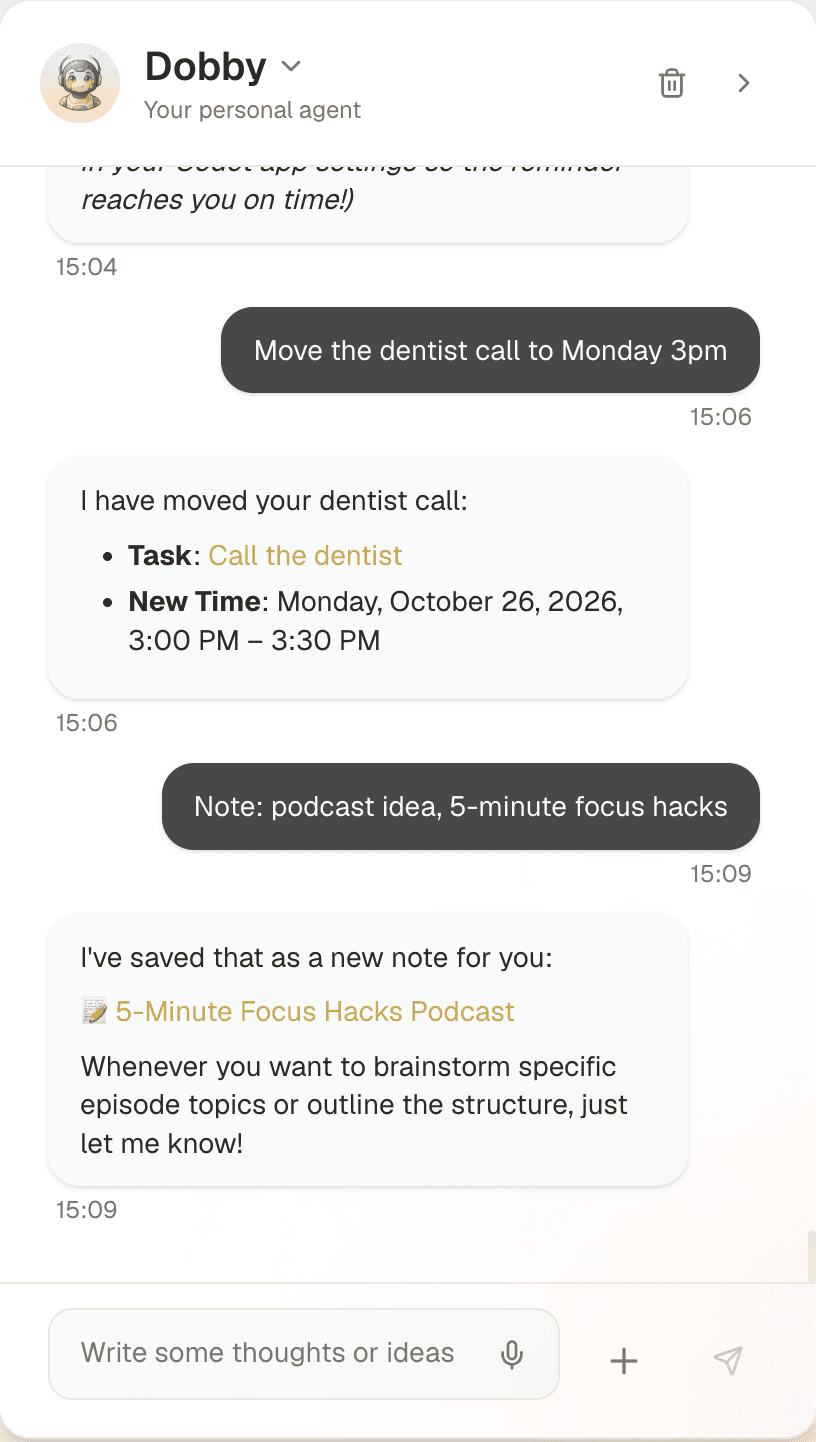
It also covers the part of "work while I'm away" that most people actually need:
- Email triage. On iPhone, Codot sorts your Gmail or Outlook inbox and drafts replies to the important messages, which you review before anything goes out.
- Daily briefings and scheduled automations. Each morning on iPhone it tells you what's due and what slipped, and recurring jobs you set up by voice (a Friday summary of your week) run on their own.
- A personal CRM. Mention that a client is moving offices, and it's there before your next call.
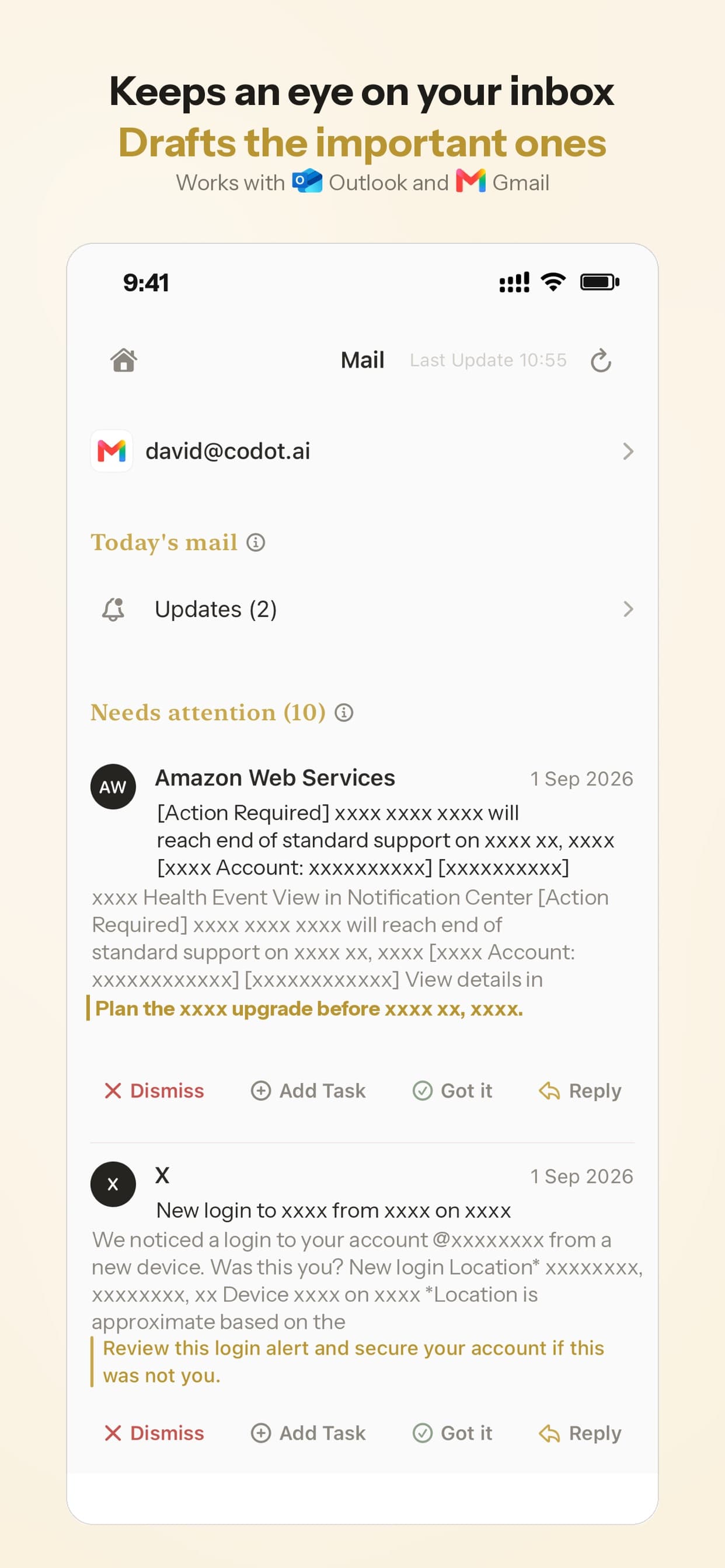
Codot only works with what you tell it and the inbox you choose to link. Your data is encrypted and never sold. Codot's free plan covers tasks, the calendar, notes, the personal CRM, habits, calorie logging and expenses. Reminders at a set time, repeating tasks, daily briefings, scheduled automations and email triage are part of Codot Max ($12.99 a month or $99.99 a year, with 20x the free plan's usage). Every new account gets 7 days of Max free, then drops back to the free plan without charging you.
Where Codot falls short of Grok Bot
Codot doesn't browse websites, fill in forms or buy things for you, and it has no fleet of agents passing work between them. If you want a Bot to update a website, reconcile a spreadsheet against a portal, or research accounts overnight, Grok Bot can do that and Codot can't.
Which one I'd pick
- You have repeatable web or office work you can describe in a paragraph (pipeline research, bookkeeping catch-up, website edits): Grok Bot on Premium. Start with one Bot and work accounts only, then add more once you know where the weekly limit bites.
- You're in the US and already pay for Claude Pro: try Duet first. You want a free test: Muse, on a secondary account.
- Your problem is that tasks, follow-ups and promises never get written down in the first place: start with Codot. It's free, and capture takes seconds. If you later find work you'd happily hand to an agent, the ADHD-focused agent ranking compares them by how much setup they take.
My own view: most people who sign up for an execution agent spend the first week looking for a job to give it. If that's you, the bottleneck is capture, and $30 a month won't fix it.
FAQ
How much does Grok Bot cost?
As of October 24, 2026, new customers get Grok Bot from The X Subscription Premium plan at $30/month or $300/year. Super ($100) and Ultra ($200) give bigger weekly usage. The $8 Plus plan doesn't include Grok Bot, and older Cursor and SuperGrok plans that include it still work.
Is Grok Bot safe to connect to my email?
It asks before actions you mark as "Ask first," hands you the screen for passwords, and keeps app login tokens off the Bot's computer. But all your Bots share one browser and one set of files, so anything one Bot can reach, the others can too. Connect only what a task needs.
Grok Bot vs Meta Muse: which is better?
Muse has a free tier. Grok Bot costs $30/month but runs several Bots in parallel, works on desktop and phone, and can learn a workflow from a demonstration. For occasional errands, try Muse first. For recurring business work, Grok Bot does more.
How is Codot different from Grok Bot?
Grok Bot is an execution agent: you hand it a job and it works through websites and apps. Codot is a voice-first personal assistant: you talk, and it turns what you say into tasks, events, notes and contacts, triages your inbox and sends daily briefings on iPhone, and keeps you on track with scheduled automations. The free plan covers capture; inbox triage, briefings and automations need Codot Max ($12.99/month, with a 7-day free trial). It doesn't browse websites or make purchases.
If most of your to-dos start as a thought you're about to lose, download Codot free on the App Store.
Productivity & Tools Desk
This article was created with AI assistance and reviewed by our editorial team.Learn about our content process.